> ## Documentation Index
> Fetch the complete documentation index at: https://docs.guidewhale.com/llms.txt
> Use this file to discover all available pages before exploring further.
# Content Templates
> Reuse common content layouts and design patterns by using pre-built or custom templates to create content faster and more consistently.
## Why it Matters
Templates allow you to create professional, well-structured content faster by providing pre-designed layouts and flows. Instead of starting from scratch, you can customize proven patterns that follow best practices for user engagement and onboarding.
## Best Practices
* **Start with a template** to save time and follow proven patterns
* **Customize branding** to match your application's look and feel
* **Test variations** to see which template styles resonate with your users
* **Create custom templates** from your highest-performing content for future reuse
## Creating a Template
GuideWhale ships with some pre-built templates to get you started, but you should create your own templates to match your application's look and feel.
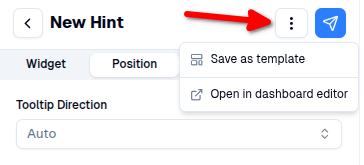
1. You can save a new template by opening a guide step or widget (banner, modal, hint, embed) editor and selecting the `Save as template` option from the top right context menu.
 2. Then you can configure your template before saving it.
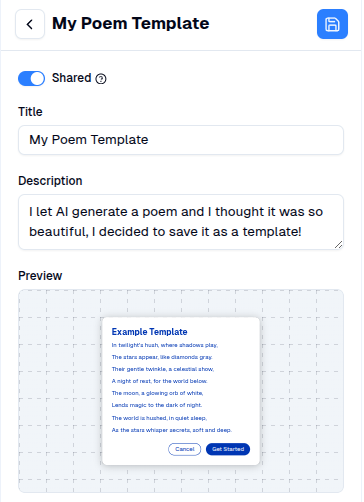 * **Shared:** enable if you want to share this template with your team members. If disabled, the template is private to you.
* **Title:** used to easily lookup and search for your template.
* **Description:** optional description to help your team understand what the template is supposed to be used for.
* **Preview:** How saved template will look like in the editor.
* **Shared:** enable if you want to share this template with your team members. If disabled, the template is private to you.
* **Title:** used to easily lookup and search for your template.
* **Description:** optional description to help your team understand what the template is supposed to be used for.
* **Preview:** How saved template will look like in the editor.